The problem with one phone
Almost every team that supports customers on WhatsApp begins the same way: one handset, or one login to WhatsApp Web, shared between whoever is on shift. It works for a while. Then volume grows and the cracks turn out to be structural rather than occasional.
There is no queue, so nobody can see what is waiting. There is no ownership, so two agents open the same chat and send two different answers. There is no record, so when someone leaves the team, every promise they made to a customer leaves with them. And there is no way to answer the simplest management question there is: how long are people waiting?
- A message read by one agent looks read to everyone, so it gets skipped
- Two agents replying to the same customer with conflicting answers
- No idea who promised a refund, a discount or a delivery date
- History tied to a device instead of the business
- No response-time or volume figures to manage against
A shared inbox fixes these by changing the unit of work. Instead of a stream of messages on a device, you get conversations with an owner, a status and a history.
How the shared inbox works
Every incoming message on your connected WhatsApp number becomes a conversation in one list the whole team can see. Nothing is assigned automatically unless you set up routing rules — by default it sits in a shared pool, waiting for someone to pick it up.
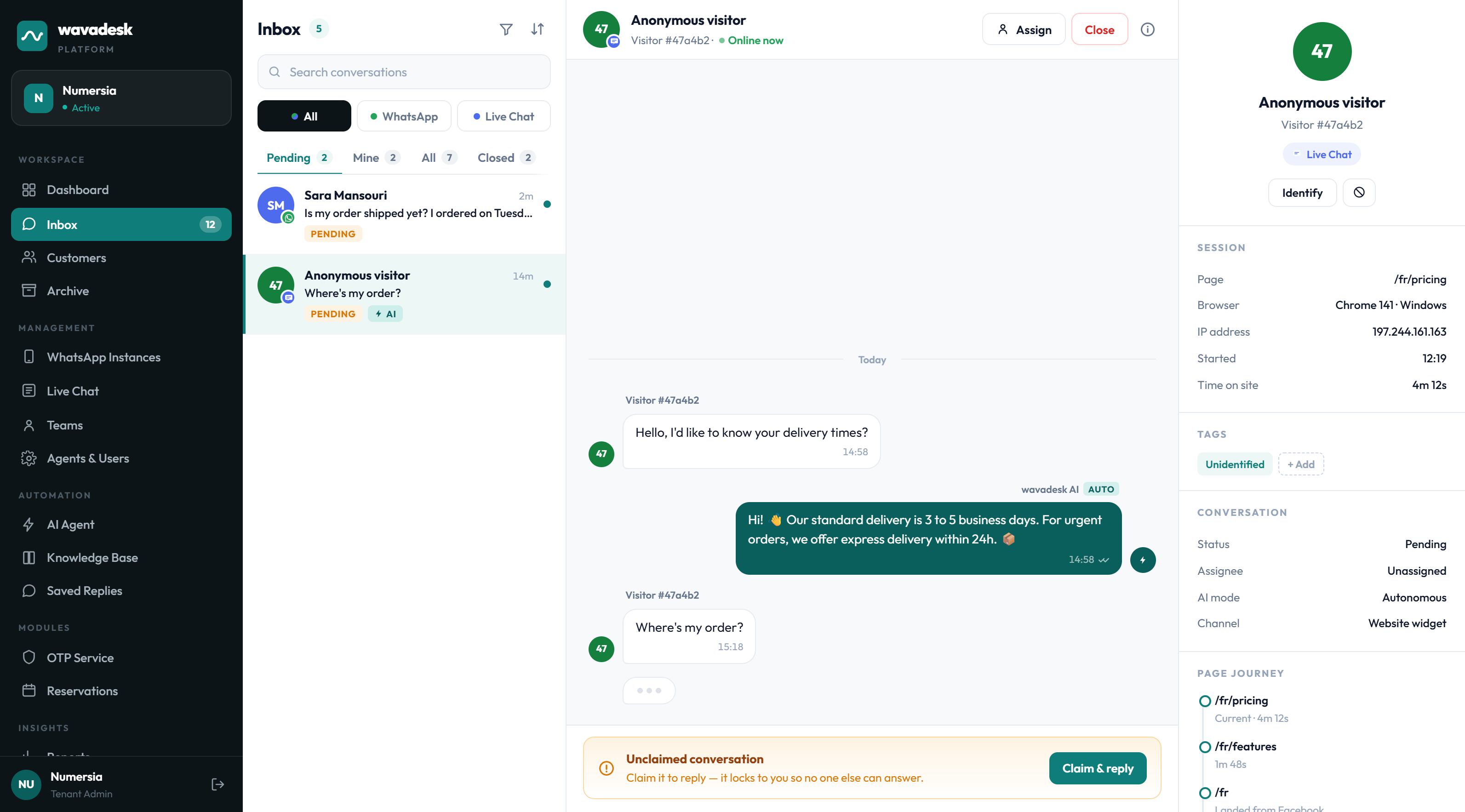
The three panes map onto the three questions an agent has at any moment: what is waiting, what am I replying to, and who am I talking to. Channel badges on each avatar tell you whether a conversation arrived over WhatsApp or the website widget, so one queue can carry both without confusion.
Every conversation from every connected channel lands in the same list, filterable by channel, status and assignee.
An agent claims a conversation and it locks to them. The claim is enforced at the database level, not just in the interface.
Notes are visible to your team and never sent to the customer, so context travels with the conversation.
Open, claimed, resolved, reopened. Every state change is timestamped with a name against it.
Claim locking, and why it matters
The single worst moment in shared support is two people answering the same customer. It is worse than a slow reply, because the customer now has two answers and no idea which is true — and your team has to unpick it in front of them.
wavadesk prevents it structurally rather than socially. When an agent claims a conversation, the claim is written as a lock. A second agent opening the same conversation sees it as claimed and cannot take it or send into it. There is no race condition to lose, and no convention for a busy team to forget under pressure.
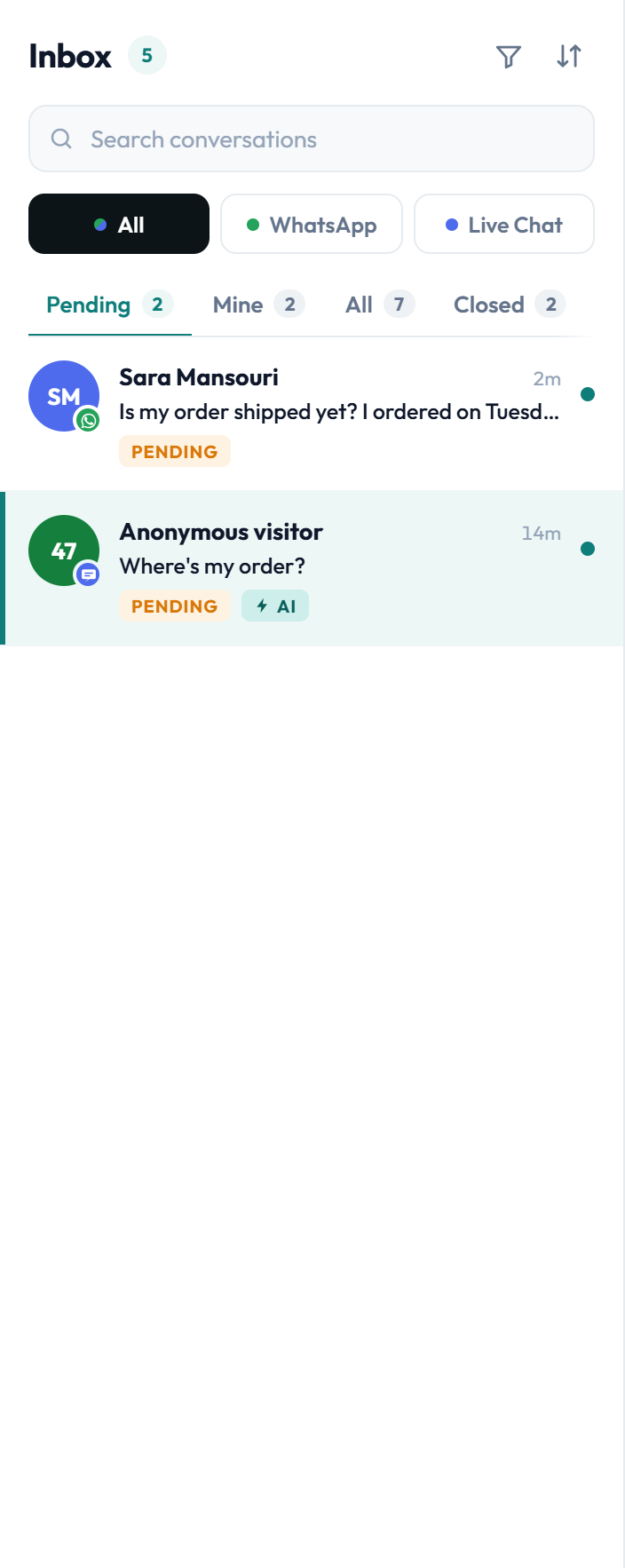
An agent can release a conversation back to the pool, and a lead can reassign it. Locking prevents accidental collisions, not deliberate handovers.
When a claim is released or reassigned, that too is recorded. Over a week you can see not only who answered what, but where work moved between people — which is usually where delays hide.
One customer, one history
A conversation is only useful with the history behind it. When a customer messages for the fourth time this month, the agent should not be asking them to explain their situation again.
Every conversation opens with the customer's full past thread attached, regardless of which agent handled those earlier exchanges or which channel they arrived on. If someone asked a question through your website widget in August and messages on WhatsApp in September, it is one history, not two.
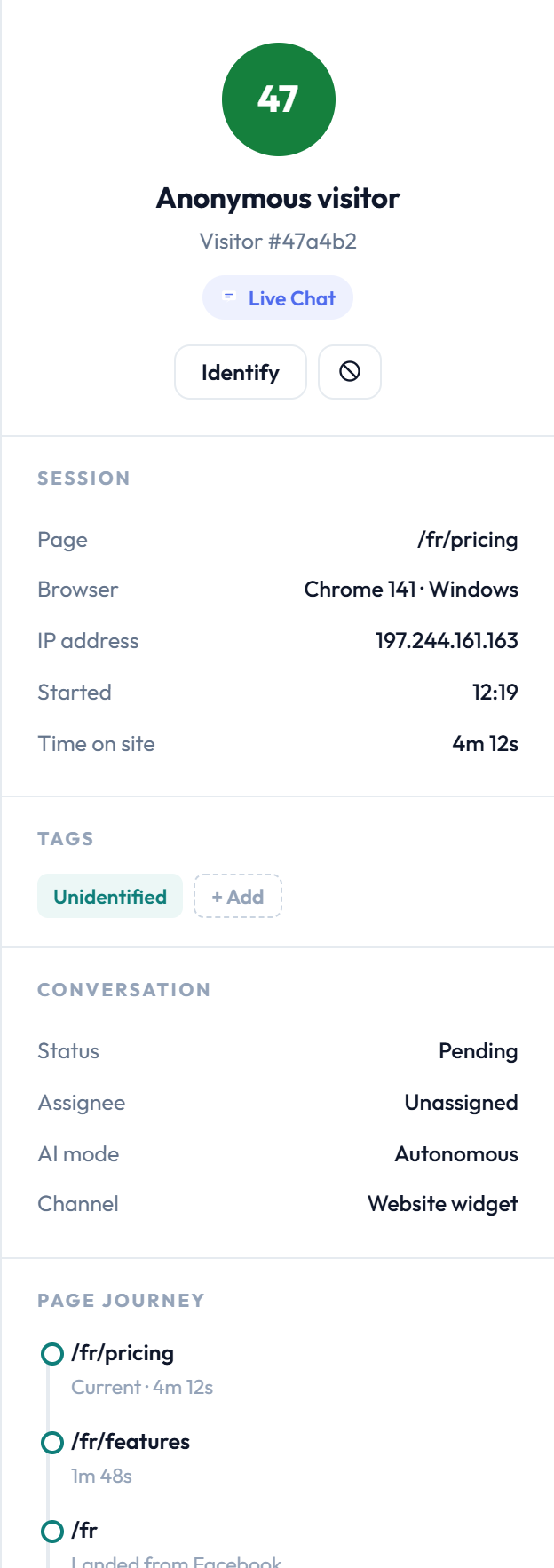
What travels with the customer
- Every previous conversation on any connected channel
- Tags you have applied, for segmenting and filtering
- Internal notes your team left on past conversations
- Assignment history and resolution status
- Order or booking references, where you have connected them
Every action is attributable
Support disputes are almost never about what a customer said. They are about what your team said. An audit trail turns that from an argument into a lookup.
wavadesk records who claimed a conversation, who replied, what was sent, when statuses changed, which notes were added, and where the AI acted on its own. Nothing is anonymous and nothing is silently editable.
This matters in three practical situations: a customer insists they were promised something, a new agent needs to understand how a case was handled, and a manager needs to see whether a process is actually being followed rather than nominally in place.
Getting connected
Setup is deliberately short, because a support tool that takes a week to install never gets installed.
Connect your existing WhatsApp Business number the same way you connect WhatsApp Web. No number migration, and nothing changes for your customers.
Add the people who will answer, and put them into teams if you want routing by department.
Give the AI agent something to answer from. This is optional at the start and can be added later.
Conversations begin landing in the shared pool immediately. Your team claims and replies from the browser.
They keep messaging the number they already know. The change is entirely on your side of the conversation.
Who a shared inbox is for
The pattern is consistent: a shared inbox pays off the moment more than one person is expected to answer the same number. Below that, a phone works fine. Above it, the phone is the bottleneck.
Order status, delivery windows, returns and exchanges — high volume, mostly repetitive, easy to lose track of.
Appointment requests, reschedules and reminders, where a missed message is a missed booking.
Handover between shifts is where shared phones fail hardest and where a queue with history helps most.
Any operation where somebody has to answer for response times rather than guess at them.
Frequently asked questions
Do I need a new phone number?
No. You connect the WhatsApp Business number you already use by scanning a QR code, exactly as you would connect WhatsApp Web. There is no migration and no porting.
Your customers keep messaging the same number, so nothing changes on their side.
Can two agents reply to the same customer by accident?
No. Claiming a conversation writes a lock, and a second agent cannot claim or send into a conversation that is already claimed. The lock is enforced in the database rather than only in the interface, so it holds even when several people click at the same time.
What happens to our history when an agent leaves?
It stays with the workspace. Conversation history, notes and tags belong to the business, not to a device or a personal login, so removing an agent does not remove the record of what they handled.
Does it work alongside the WhatsApp app on my phone?
We recommend running the number through wavadesk so the queue is the single source of truth. Replying directly from the handset bypasses claiming and the audit trail, which is exactly the behaviour a shared inbox exists to remove.
Is there a limit on conversations?
No. Every plan includes unlimited WhatsApp conversations with no per-message fee and no Meta conversation fee. Plans differ on user seats, AI message allowance and which modules are switched on.
Can I see how long customers are waiting?
Yes. The dashboard reports median first reply, resolution time, volume by channel and per-agent workload, and the queue itself surfaces the oldest unclaimed conversation so nothing quietly ages.