What the AI agent actually does
Support volume is rarely made of hard questions. It is made of the same forty questions arriving in different words: where is my order, do you deliver on Sundays, can I change my address, what are your opening hours, how do I return something.
The AI agent reads an incoming message, matches it against the knowledge you have given it, and produces an answer in your wording. Depending on the mode you choose, it either hands that draft to an agent or sends it directly. Everything it does lands in the same shared inbox as human replies, tagged so you can always tell them apart.
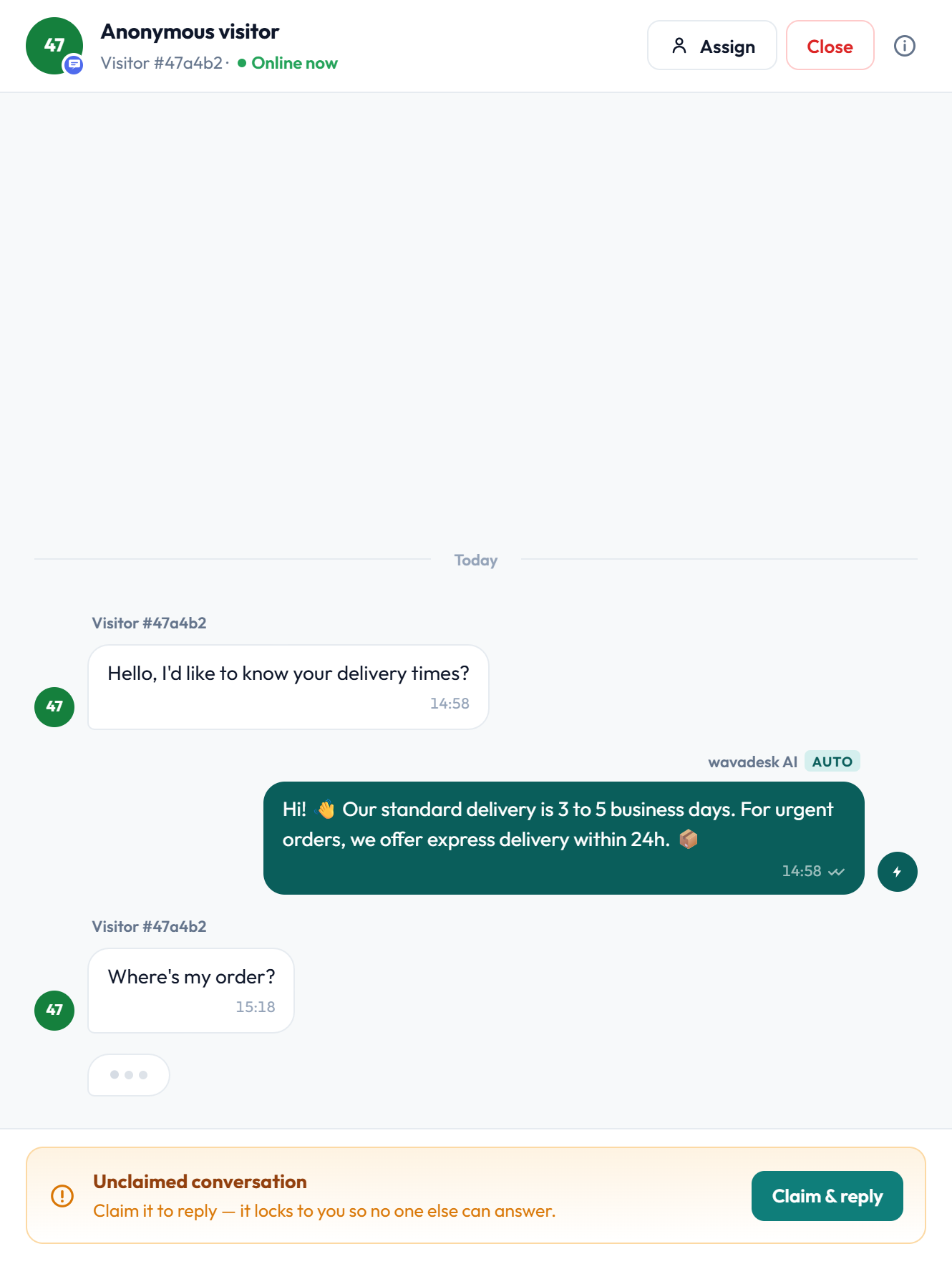
The agent answers from your knowledge base. If the answer is not in there, it does not invent one — it escalates. See Knowledge base for how to feed it.
Three modes, and when to use each
The most common worry about AI support is losing control of what customers are told. wavadesk answers that with modes rather than promises: you choose how much autonomy the agent has, and you can change it at any time.
The AI drafts, your agent reads it, edits if needed and sends. Nothing reaches a customer without a human pressing send. Start here.
The AI replies directly, without waiting for an agent. Best once you trust its answers on a defined set of topics.
Autonomous on the questions you have approved, suggest-only on everything else. This is where most teams settle.
No AI involvement at all. The knowledge base still powers agent-facing saved replies.
A sensible rollout
- Run in suggest mode for a week and watch what it drafts. You will find gaps in your FAQ fast.
- Fix those gaps. The drafts improve immediately because the source improved.
- Switch the questions it consistently gets right to autonomous, and leave the rest on suggest.
- Review the deflection figures monthly and widen the autonomous set as confidence grows.
Suggest mode is not a trial version — it is how you learn what your knowledge base is missing, without a customer being the one to discover it.
How it stays accurate
An AI support agent is only as good as what it is allowed to say. Two mechanisms keep the wavadesk agent inside the lines.
It answers only from your knowledge base
The agent's source of truth is the knowledge you upload: your FAQ, policies, delivery terms, opening hours, return rules. It is not answering from general world knowledge, which means it cannot confidently invent a refund policy you do not have.
It escalates when it does not know
When a message falls outside what your knowledge covers, or matches an escalation keyword, the agent stops and hands the conversation to a human rather than producing something plausible. Not answering is treated as the correct outcome, not a failure.
- Answers drawn from your uploaded FAQ and policies
- Replies phrased in your tone, because your source text sets it
- No answer invented when the knowledge is missing
- Escalation keywords force immediate handover
- Every automated reply logged and attributable in the audit trail
Escalation and handover
The point at which AI stops is more important than the point at which it starts. A refund dispute, a complaint, a legal threat or a distressed customer should reach a person immediately, and should never sit in a loop with a bot.
You define escalation keywords — words and phrases that mean a human is required. When one appears, the AI withdraws from the conversation, the conversation moves into the appropriate team queue, and an agent claims it as normal. The customer is not told they have been handed over; the conversation simply continues.
Typical escalation triggers
- Complaint and dispute language: refund, chargeback, complaint, lawyer
- Sentiment signals: repeated messages in quick succession, capitals, profanity
- Named high-value accounts you always want handled by a person
- Topics you have deliberately excluded from automation
- Any question where the knowledge base returns nothing confident
The AI does not attempt one more answer before handing over. When a trigger fires, it stops.
Measuring whether it is working
The number that matters is not how many messages the AI sent. It is how many conversations it closed without a human, and whether the ones it escalated were the right ones.

Three figures tell you almost everything. Deflection rate is the share of conversations the AI resolved end to end. Median AI reply time shows the speed advantage over a human queue. Escalation count is your safety valve — if it drops to zero, the agent is probably answering things it should be handing over.
Full reporting is covered in Support reports and analytics.
How AI usage is priced
AI replies are metered as AI messages. Each plan includes a monthly allowance, and you can add packs without changing plan if a busy month runs long.
| Plan | Included AI messages | If you need more |
|---|---|---|
| Starter | 1,000 / month | Add 2,500-message packs |
| Growth | 5,000 / month | Add 2,500-message packs |
| Scale | Unlimited | No cap, no packs needed |

WhatsApp conversations themselves are always unlimited on every plan — there is no per-message fee and no Meta conversation fee. Only AI replies are metered.
Frequently asked questions
Will the AI reply to my customers without me approving it?
Only if you choose autonomous or hybrid mode. In suggest mode — the default we recommend starting with — the AI drafts and a human sends. You can change mode at any time.
Where does the AI get its answers?
From the knowledge base you upload: your FAQ, policies, delivery terms and opening hours. It is grounded in your own material rather than general web knowledge, so it answers in your wording and within your policies.
What if it does not know the answer?
It escalates to a human instead of guessing. A message that falls outside your knowledge, or that matches an escalation keyword, is handed to the relevant team queue for an agent to claim.
Can customers tell they are talking to AI?
AI replies are clearly labelled inside your inbox so your team and any auditor can tell. What you disclose to customers is your choice, and many teams do say so in their welcome message.
What happens when I hit my AI message allowance?
AI replies pause and conversations continue to your human agents as normal — nothing breaks and no customer is left unanswered. You can add a message pack mid-cycle to resume, or upgrade to Scale for unlimited.
How long does it take to set up?
Pasting an existing FAQ takes minutes and is enough to start in suggest mode. Most teams then spend a week refining based on what the drafts reveal about gaps in their documentation.